You keep your own number. With call forwarding, calls you don't answer go to BelBuddy. You switch it on and off on the phone itself.
Open Call forwarding on your mobile phone
Open the BelBuddy app or app.belbuddy.eu on the phone whose number you want to forward. Choose Settings and then Turn call forwarding on or off.
Choose when BelBuddy answers
When I don't answer: your phone rings as normal first. This is what we recommend. Always: your phone doesn't ring, which is handy when you're on holiday.
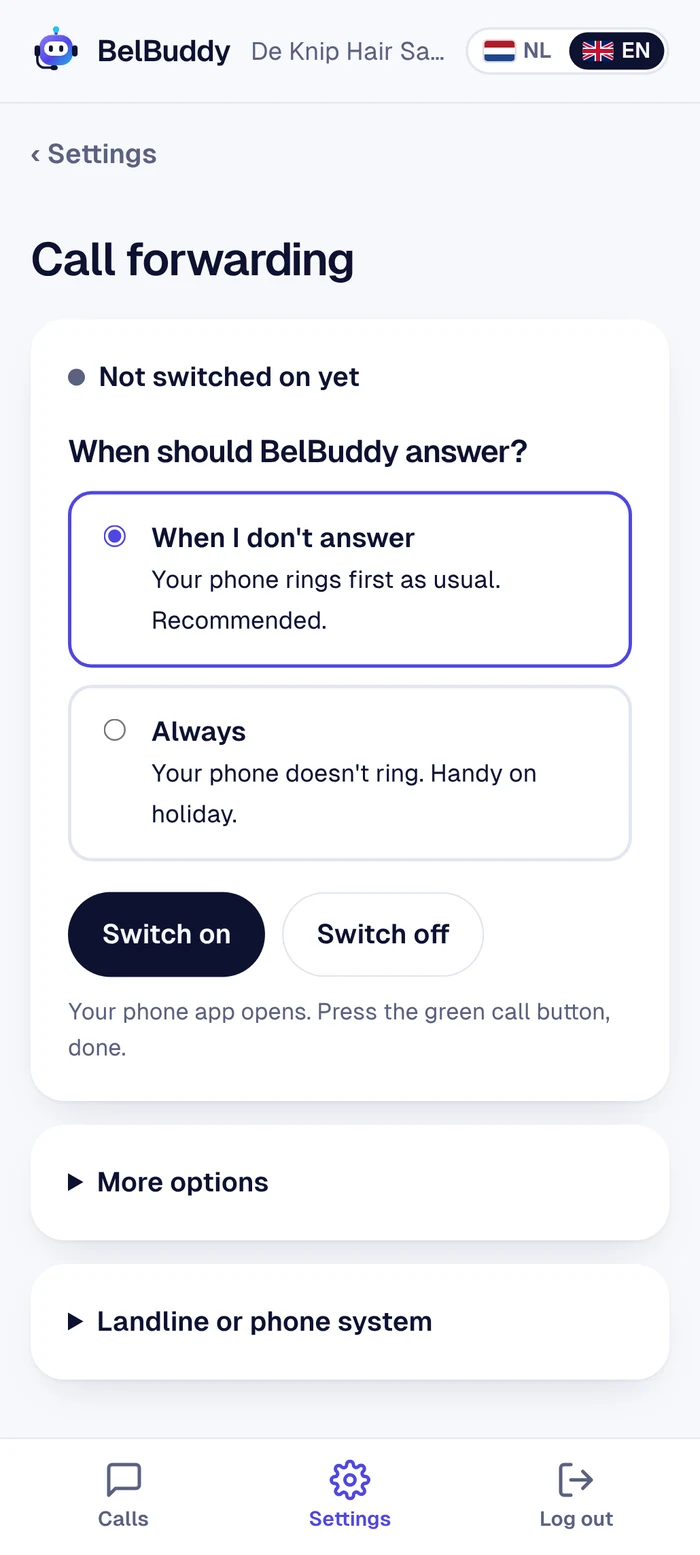
Tap Turn on
Android: your phone app opens with the code already filled in. Press the green call button.
iPhone: the code is copied. Open Phone, press and hold the number field, choose Paste and press call.You'll hear or see a confirmation from your provider. Done.
Turning it off
Tap Turn off. All your call forwarding is then switched off and your phone works as it always did.
More options
Under More options you can set how long your phone rings first (5 to 30 seconds) and check whether call forwarding is switched on. Prefer to dial it yourself? Then use these codes with your BelBuddy number:
| When I don't answer | **004*your BelBuddy number# |
|---|---|
| Always | **21*your BelBuddy number# |
| All off | ##002# |
Landline or phone system
Do you use a landline or a phone system (for example Voys, 3CX or Teams)? Set this up there once: if unanswered, forward to your BelBuddy number. We're happy to help you with this via [email protected].
Still stuck?
Email [email protected] or ask your question in the chat at the bottom right. We're happy to help, including with the setup.